


发布时间 : 2019-11-01 11:24:19.580|阅读 308 次
概述:本示例说明如何从JavaScript代码创建仪表板。
相关链接:
Stimulsoft Dashboards.JS是一个功能齐全的工具,用于为JavaScript平台创建仪表板。要生成和查看仪表板,您需要任何支持HTML5和JavaScript的Web浏览器。当不需要服务器端时,它可以作为客户端工作,也可以在服务器端使用服务器端。该软件与Node.js完美兼容。
立即点击下载Stimulsoft Dashboards.JS最新版
本示例说明如何从JavaScript代码创建仪表板。
<script type="text/javascript">
    var designer;
    var viewer = new Stimulsoft.Viewer.StiViewer(null, "StiViewer", false);
    viewer.report = Stimulsoft.Report.StiReport.createNewDashboard();
function onShowClick() {
        // Evalute code
        eval(codeString.value);
        // Assign dashboard to the viewer
        viewer.report = report;
    }
function onEditClick() {
        // Evalute code
        eval(codeString.value);
        // Assign dashboard to the viewer
        viewer.report = report;
        if (!designer) {
            // Set full screen mode for the designer
            var options = new Stimulsoft.Designer.StiDesignerOptions();
            options.appearance.fullScreenMode = true;
            // Create the dashboard designer with specified options
            designer = new Stimulsoft.Designer.StiDesigner(options, "StiDesigner", false);
            // Add the exit menu item event
            designer.onExit = function (e) {
                designer.visible = false;
            }
            // Show the dashboard designer
            designer.renderHtml("designerContent");
        }
        else {
            designer.visible = true;
        }
        // Assign dashboard to the designer
        designer.report = viewer.report;
    }
</script>
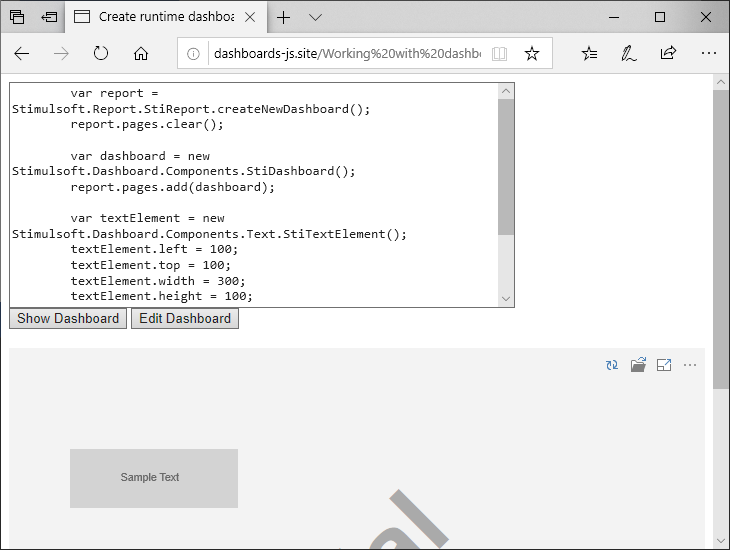
在下面的屏幕截图中,您可以看到示例代码的结果。
 渝ICP备12000582号-15/渝公网安备 50010702501010号
 首页
首页



 客服热线
客服热线